
The available portable wireless digital panel meter for sale, adopts wireless/wired sensor interface optional, provides 5 digit clear display. Alarm limit can be set upper and lower limit, coordinate range is adjustable, and capture length is up to 999999 seconds. Wireless mode is easy to set up, built-in battery lasts 24 hours, wide range of operating temperatures, low cost for stable data measurement.
Specifications
| Model | ATO-TYSC |
| Sensor Interface | Wireless/wired (optional) |
| Display Unit | kg, t, kN, N, lb |
| Sampling Speed | 7.5Hz 15Hz 30Hz 60Hz 120Hz |
| The sampling rate of the wireless mode is fixed at 7.5Hz. | |
| Display Bits | 5 digit |
| Comprehensive Accuracy | 0.05% |
| Operating Temperature | Charge 0~45°C, Discharge -10~50°C |
| Battery Continuous Operating Time | 24 hours |
| Alarm Upper Limit | -19999~99999 |
| Lower Alarm Limit | -19999~99999 |
| Capture Length | 5~99999 seconds (return to measurement interface after capture) |
| Set Coordinate Range | 0~99999 |
| Clear Memory Space | None |
| Peak Hold Time | 0~86400 seconds |
| First Peak Predefined Value | 0~99999 |
| Wireless Mode Parameters | Accept Transmit Disable (need to re-power up after setting) |
| Number of Decimal Places | 0 1 2 3 4 bits |
| Power Adapter | 9V DC 2A (Adapter input voltage AC-100-240V, 50/60HZ) |
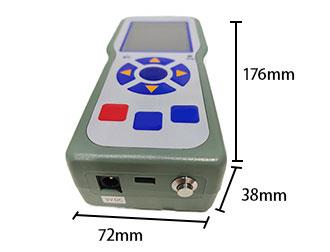
| External Dimensions | 176*72*38mm |
| 5-pole Air Plug Definition | Pin 1: Signal negative (white line) |
| Pin 2: Signal positive (green line) | |
| Pin 3: Negative excitation (black line) | |
| 4 pins: Excitation positive (red line) | |
| 5 pins: Null |
Feature
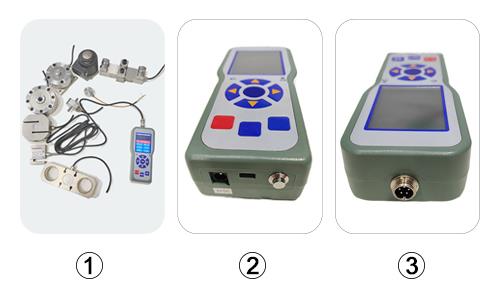
- Digital Display: Built-in rechargeable lithium battery, suitable for the site complexity, inconvenient wiring and interference with the use of large force measurement occasions. Can be used in combination with a variety of force sensors.
- USB Data Interface: Connect to computer via USB, export TXT data to view force curves through supporting software.
- Aviation Plug: Connected to the sensor through the aviation plug. Can be built-in wireless receiver module, into a wireless handheld digital panel meter.
Dimension (unit: mm)
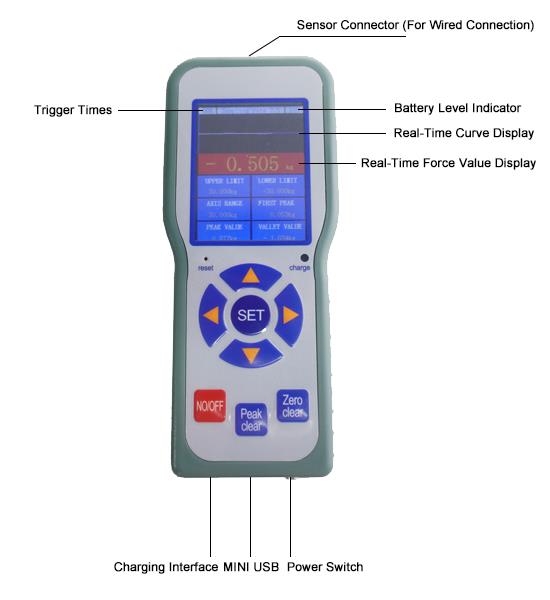
Details
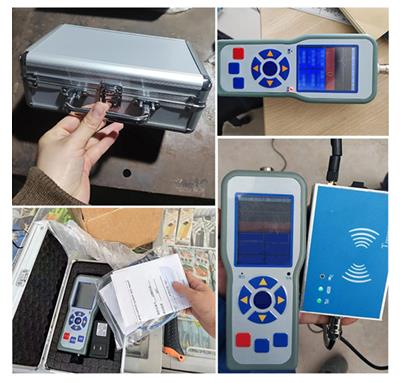
Field Cases
Tips: Protable wireless digital panel meter for quick calibration/scalibration
- When the sensor or sensor device is unloaded, press "Setup" to enter the parameter table.
- Find "Sensor Calibration" and press "▶" key to enter, input the password 011111, after determining the zero point, it will display "00000" and the last digit will be red, then press "◀", "▲", "▲", the display value will be set to the weight value to be added to the sensor device. After setting, add the set weight to the sensor and press "Set" key after stabilization.
- The display will show "-", "---", "---",... "-----" finally return to the parameter table, press the setup key to return to the measurement interface, calibration is complete.
- In the case of making sure that the sensor device is unloaded, press and hold the "Zero" key to complete the power off to save the zero (tare).
- Note: If the sensor and the handheld meter are purchased as a set and have been calibrated at the factory, please do not repeat the "Sensor Calibration".
Product reviews
Works Well in the Field
Sienna

9/18/2026 12:36 AM
This meter has been a practical addition to our testing setup. I like that it supports both wired and wireless sensors and can switch between different measurement units easily. The five-digit display is easy to read, and the readings have been consistent during regular use. The compact size also makes it convenient to carry between work areas.
Was this review helpful? (0/0)
Only registered users can write reviews
Related products

Digital Panel Meter for Displacement Sensor 4 Digit
ATO-DPM-DS4D
$174.62
Single channel digital panel meter cooperate with all kinds of analog output sensor and transmitter, realize measurement, conversion, display, transmitting, record and control, zero clearing at any time.

Digital Panel Meter for Potentiometers 5 Digit
ATO-DPM-DS5D
$226.15
Single channel digital panel meter can cooperate with displacement sensors, linear position sensors, potentiometers, etc. 16-bit A/D converter, zero clearing at any time.

Handheld Digital Panel Meter for Load Cells
ATO-DPM-920H
$349.56
Good price handheld digital panel meter designed for load sensors, with 2000Hz and 12800Hz sampling speed optional, accuracy up to 0.05%, support -15 ~ +15mV signal input, equipped with 4-inch color touch screen, display unit support kN/kg/lb/N/g/N-m, suitable for a variety of force measurement application scenarios.

Precision Digital Panel Meter for Grating Ruler 7 Digit
ATO-DPM-GR7D
$226.15
Multichannel digital panel meter for precision linear displacement sensor has power failure memory function, anti-interference, high-precision, high-speed, anti-vibration, greasy dirt resistance.