
This digital stylus force meter is a precision tool designed to accurately measure turntable tracking force for audiophiles and professionals, ensuring optimal stylus setup in home or studio vinyl systems.
Specification
| Model | ATO-5G |
| Measuring Range | 0–5 g |
| Accuracy | ±0.01 g |
| Unit | g / oz / ozt / TL / ct |
| Auto Power-Off Time | 120 s |
| Operating Temperature | 0–40 °C |
| Display | 4-digit LCD display |
| Battery | 2 × 1.5 V lithium batteries (AG12) |
| Certification | CE |
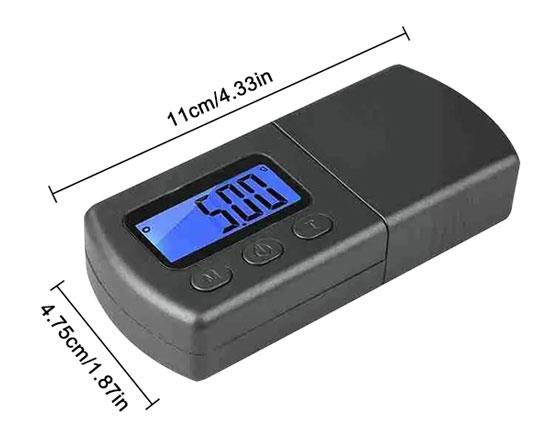
| Dimensions | 96 × 43 × 20 mm |
| Weight | 50 g |
Feature
- High precision measurement range (0–5g) ensures accurate stylus force setting, helping protect vinyl records and improve sound quality.
- The digital stylus force gauge features a backlit LCD display that provides clear readings in both bright and low-light conditions for easy operation.
- Unit conversion function (g/oz/ozt/TL/ct) allows quick switching between units for flexible and convenient use.
- The stylus tracking force gauge incorporates a water-resistant design that enhances durability and reliability for long-term use.
- Powered by 2×AG12 batteries, ensuring easy replacement and stable daily performance.
- The digital stylus tracking gauge includes an auto shut-off function (120 seconds) that helps save power and extend battery life.
- Operating temperature range (0–40°C) ensures stable performance under normal indoor conditions.
- Compact digital design makes it ideal for precise turntable stylus calibration, helping audiophiles and professionals optimize playback and protect records.
Detail
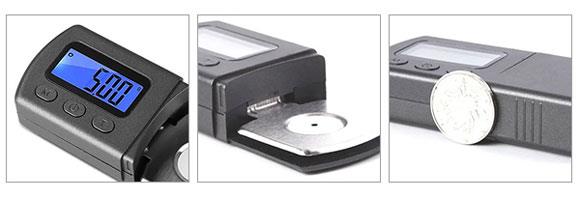
- The stylus tracking force gauge features a clear digital display for easy reading in different lighting conditions, ensuring convenient and accurate operation.
- The stylus force meter uses a stable metal contact platform to provide consistent positioning and reliable measurement results.
- Built with durable materials and strict quality control, the stylus force gauge offers strong reliability and long-lasting performance.
Size (unit: mm)
Tips: How to use a digital stylus force gauge correctly?
- Place the digital stylus force gauge securely on the turntable platter, making sure it sits flat and stable so the reading is not affected by tilt or vibration. Power on the device and, if available, press the zero/tare button to ensure the display starts from a neutral baseline.
- Next, carefully move the tonearm and gently lower the stylus onto the measuring platform of the stylus tracking force gauge. Avoid dropping or pressing the stylus, as even slight impact can affect both the measurement accuracy and the stylus itself.
- Once the stylus is resting steadily on the sensor, wait a moment for the LCD display to stabilize, then read the tracking force value shown on the screen.
- If the reading is not within the cartridge’s recommended range, adjust the tonearm counterweight gradually. Repeat the measurement process until the correct tracking force is achieved for optimal sound quality and safe record playback.
Product reviews
Easy to Use and Accurate
Hannah

8/13/2026 12:11 AM
The 0–5g range is just right for stylus setup, and the backlit display makes the reading easy to see. I also like the unit conversion and water-resistant design—it feels practical for everyday use.
Was this review helpful? (0/0)
Only registered users can write reviews
Related products

Digital Push Pull Force Gauge, 5N/10N/500N
ATO-FG-ZP
$191.27
High precision push and pull force gauge for sale online. This digital force gauge offers a LCD clear display, selectable peak loads of 0-5N/10N/20N/50N/100N/200N/500N, and unit conversions between N/kgf/LBF, easy to install and use.

Digital Push Pull Force Gauge, 2N-1000N
ATO-FG-HA1000
$227.31
Digital force gauge with built-in sensor for sale, high-efficiency and high-precision, capacity from 2N/ 3N/ 5N to 1000N. Push pull gauge equipped with 6-digit display of high resolution and optional SI unit N (Newton), kg (kilogram), and lb (pound) mutual conversion. Automatic peak function, the time can be set freely from 1 to 9999 seconds and data storage up to 447 test values. The charging voltage from 100V to 240V with short-circuit, leakage, and overload protection functions.

Digital Push Pull Force Gauge, 2 kN-2000 kN
ATO-FG-HA2000
$516.38
Digital force gauge with high accuracy measurement, capacity from 2 kN/ 3 kN/ 4 kN to 2000 kN. Force gauge meter with external sensor equipped with 6-digit large screen display and acceleration of gravity can be set by itself. Charging voltage 100V-240V. Optional SI unit: N (newton), kg (kilogram), lb (pound) available for mutual conversion and data storage can store 447 test values. Automatic shutdown time can be set by yourself. Small, simple, multi-functional, widely used in electronic appliances, architectural hardware, power machinery and so on.

Small Ergonomic Digital Force Gauge, 10N-500N
ATO-FG-ZMF
$90.88
The small ergonomic digital force gauge features three measurement modes and four measurement units, being lightweight and portable with multiple probe options. The LCD screen provides clear and instant readings. The push-pull force gauge's high-precision design ensures accurate measurements, while allowing users to set upper/lower limits with audible alarm for out-of-range values.

Handheld Digital Force Gauge, Push Pull, 0-500N
ATO-FG-DY920
$325.38
The digital push-pull force gauge is available with a variety of measuring ranges, including ±10 N, ±20 N, ±30 N, ±50 N, ±100 N, ±200 N, ±300 N, and ±500 N. Featuring an ergonomic design, this push-pull force gauge is easy to handle and operate. Ideal for laboratory research, industrial applications, and quality control, this force gauge offers precise and dependable measurements for a wide range of needs.