
The push-pull force gauge provides ±10N, ±20N, ±30N, ±50 N, ±100 N, ±200 N, ±300 N, and ±500 N. It supports multiple units of measurement such as Newtons, pounds, and kilograms. This foce gauge is designed with ergonomics in mind, ensuring easy handling and operation. Perfect for use in laboratory research, industrial settings, and quality control, the digital push-pull force gauge delivers accurate and reliable measurements to meet diverse requirements.
Specification & Feature
| MODEL | ATO-DY920 |
| Range | 0-500N |
| Sample Rate | 2000Hz |
| Nonlinear | Better than 0.2% |
| Display Indexing | -99999~999999 |
| Signal Input | -15~15mV |
| Drift | Less than 20ppm |
| Built-in Battery | 3200mAh battery, battery life lasts for 10 hours when fully charged, low battery reminder |
| Sample Rate | 50Hz~12800Hz six levels adjustable |
| Display Interface | Real-time curves, historical curves/tables, peak-to-valley value display, and switchable landscape screen |
| Real-time Monitoring | Automatically capture peak-to-valley values and analyze sensor status |
| Set the Parameters | It can be backed up and restored, and restored with one click |
| Weightless Calibration | Simply enter the sensor parameters and the calibration is complete |
| Smart Sensors | Automatic calibration and modification of corresponding units and decimal points (using our TEDS smart sensors) |
| Connect to a Computer | The TYPE-C cable (RS485 optional) can be used to export force data directly with a PC |
| Interface Test Interface | View the debugging data of serial port and wireless communication |
| Data Retention | 200 sets of historical data of peak and valley values are saved, and they are not lost when the power is off |
| Alert Method | Upper limit alarm, lower limit alarm, peak-to-valley alarm, and automatic alarm for double the overrange |
| Capture Method | Threshold-Threshold, Threshold-Time, Threshold-Button |
| Built-in Sensors | Optional |
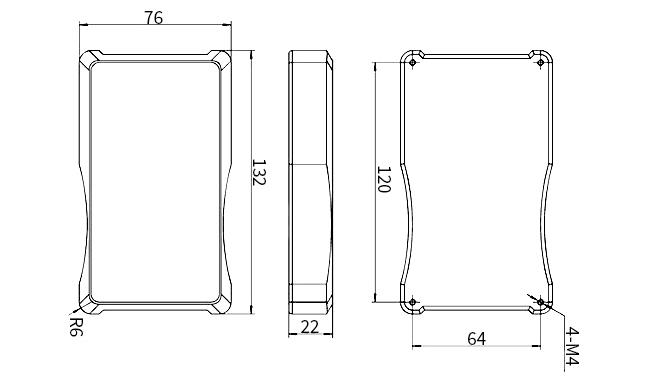
Dimension (mm)
Status Icon
| Icons Name | Icons | Description |
| Transient Regime |  | Force value instability: When the force value fluctuation is greater than the stability condition parameter, the icon will appear, indicatingl that the system is currently in an unstable state |
| Zero Status |  | When the real time force value is less than the automatic zero range of the power, it will be zero and the icon will be displayed |
| Wireless Commun Ication |  | When the handheld instrument wireless comunication is successful, the icon will be displayed and will disappear when there is no communication within 200 ms |
| String Commun Ication |  | When the handheld instrumenti serial comunication is successful, the icon will be displayed and will disappear when there is no communication within 200 ms |
| Alert status |  | When the handheld instrument reaches the set alarm condition,the icon will be displayed and the buzzer will work, when the real time force value exceeds the set range, the icon will be displayed at 50ms interval and the buzzer works for 100 ms interval |
Application

Tips: How to Select a Pull Push Force Gauge
When selecting a Pull Push Force Gauge, several factors should be considered to ensure it meets your specific measurement requirements. Some of the key factors to consider include:
- Measuring Range and Capacity: Determine the range of forces you need to measure, as well as the maximum capacity required for your applications. Ensure that the force gauge has a measuring range and capacity suitable for your intended use.
- Accuracy and Resolution: Look for a force gauge with high accuracy and resolution to ensure precise measurements. Consider the level of accuracy needed for your applications and choose a force gauge that meets those requirements.
- Display Type and Readability: Consider whether you prefer a digital or analog display for your force gauge. Digital displays typically offer easier readability and may provide additional features such as peak hold and real-time data logging.
Product reviews
Robust and simple to use
Ethan

12/3/2025 2:03 AM
I’ve been using this digital push-pull force gauge (±500 N) for routine testing, and it has proven to be both accurate and very easy to handle. The ergonomic design makes it comfortable to operate during longer sessions, and the readings are consistent enough for our lab work as well as basic quality-control checks. It’s robust, simple to use, and reliable for a wide range of measurements, making it a useful tool in both our workshop and testing department.
Was this review helpful? (0/0)
Only registered users can write reviews
Related products

Digital Push Pull Force Gauge, 2 kN-2000 kN
ATO-FG-HA2000
$516.38
Digital force gauge with high accuracy measurement, capacity from 2 kN/ 3 kN/ 4 kN to 2000 kN. Force gauge meter with external sensor equipped with 6-digit large screen display and acceleration of gravity can be set by itself. Charging voltage 100V-240V. Optional SI unit: N (newton), kg (kilogram), lb (pound) available for mutual conversion and data storage can store 447 test values. Automatic shutdown time can be set by yourself. Small, simple, multi-functional, widely used in electronic appliances, architectural hardware, power machinery and so on.

Digital Push Pull Force Gauge, 2N-1000N
ATO-FG-HA1000
$227.31
Digital force gauge with built-in sensor for sale, high-efficiency and high-precision, capacity from 2N/ 3N/ 5N to 1000N. Push pull gauge equipped with 6-digit display of high resolution and optional SI unit N (Newton), kg (kilogram), and lb (pound) mutual conversion. Automatic peak function, the time can be set freely from 1 to 9999 seconds and data storage up to 447 test values. The charging voltage from 100V to 240V with short-circuit, leakage, and overload protection functions.

Mechanical Force Gauge, 20N/30N/100N/200N/500N
ATO-FG-NK
$113.46
Mechanical force gauge with high efficiency, capacity 20N/ 30N/ 100N to 500N. Push pull gauge with pointer can be used for switching between peak load (PEAK) test and continuous load value (TRACK) test and the switching knob (PEAK/TRACK button). Push-pull stroke 10mm and work at temperature 10℃~30℃. Two kinds of units are displayed at the same time: NK series are displayed in N (Newton) and kg (kilogram). Widely used in electronics, high and low voltage electrical appliances, hardware locks.

Digital Push Pull Force Gauge with Spring, 10N-500N
ATO-FG-DF
$124.23
Spring force gauge for sale, digital push pull force gauge with capacity 10N/ 20N/30N to 500N. Spring force gauge has optional SI unit N (newton), kg (kilogram), lb (pound) available for mutual conversion with high precision and high efficiency. 1.5V lithium battery power supply, automatically shut down if there is no operation for ten minutes. Measurement accuracy reaches 0.01N with peak mode and real time mode. Widely applicable to product push-pull load test, insertion force test, destruction test, etc.