HMI Touch Screen, 7 Inch, 800 x 480

$369.72
Low cost HMI touch scaeen for sale, manufacturer direct sales, 7 inch Human Machine Interface display touch screen, 800 x 480 pixels. HMI uses the latest Cortex-A8 / dual-core high-speed processor and a 65,536-color color LCD screen with high brightness and contrast, manufacturer direct sales.
SKU: ATO-HMI-7
*
Free Shipping
Delivery date: 6-12 days

HMI toch sreen manufacturer direct sales, industrial HMI touch panel with 10 inch TFT LCD display, 1024 x 600 pixels, equipped with HMI programming software DOPSoft 4.0 and built-in Lua editor, it can be easily programmed, and has alarm / history / user rights functions for efficient management.

Specification:

ModelATO-DOP-107CVATO-DOP-B07S415
LCD ModuleDisplay7" TFT LCD
Resolution800 x 480 Pixels
Back LightLED Back Light
Back Light Brightness400 cd/m2350 cd/m2
Back Light Life20000 Hours
Display Area226 X 128.7 mm/
Display Colors/65536 Colors
MCUARM Cortex-A8 (800MHz)400 MHz
Flash ROM256 Mbytes128 MB
RAM256 Mbytes64MB
Touch PanelFour-wire resistor, over 10,000,000 pressing times
Backup Memory (Bytes)/16 MB
Audio OutputBuzzerMulti-Tone Frequency (2K ~ 4K Hz) / 80dBMulti-Tone Frequency(2K ~ 4K Hz)/ 85dB
AUXN/AN/A
USB1 USB Slave Ver 2.0 / 1 USB Host Ver 2.01 USB Host Ver 1.1 / 1 USB Client Ver 2.0
SDN/ASD card (Supports SDHC)
Serial COM PortCOM1RS-232 (supports hardware flow control)RS-232 (Supports hardware flow control) (Note 2)
COM2RS-232 (supports hardware flow control) / RS-485*2RS-232 / RS-422 / RS-485(Note 2)
COM3RS-422 / RS-485*2RS-232 / RS-422 / RS-485(Note 2)
VGA Input/N/A
Delta Professional Integration Function/N/A
Function Key/N/A
Perpetual Calendar RTCBuilt-in
CoolingNatural air circulation
CertificationCE, UL
WaterproofIP65 / NEMA4 / UL Type 4X
Operation Voltage*3DC +24V (-15% ~ 15%)*2
Voltage EnduranceA500V for 1 minute (between charging DC24 terminal and FG terminals)
Power Consumption*5Max. 8.5 W*35 W
Backup Battery3V lithium battery CR2032 × 1
Backup Battery LifeDepends on the temperature used and the conditions of usage, usually about 3 years or more at 25° C
Operating Temperature0℃ ~ 50℃
Storage Temperature-20℃ ~ 60℃
Ambient Humidity10% ~ 90% RH (0 ~ 40° C), 10% ~ 55% RH (41 ~ 50° C), Pollution Degree 2
VibrationIEC 61131-2 compliant 5Hz ~ 8.3Hz = Continuous: 3.5mm, 8.3Hz ~ 150Hz = Continuous: 1.0g
ShockIEC 60068-2-27 compliant 15g peak for 11ms duration, X, Y, Z, directions for 6 times
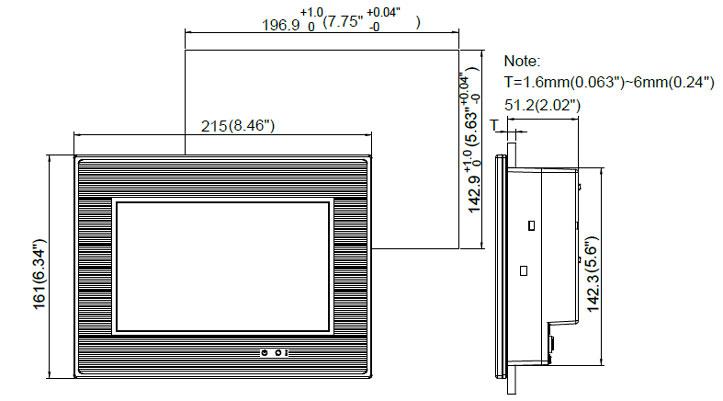
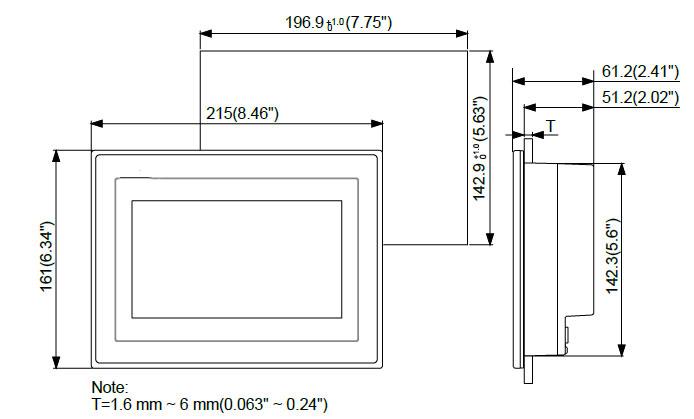
Dimensions (W) x (H) x (D)215 x 161 x 61.2mm215 × 161 × 50mm
Mounting Dimension W) x (H)196.9 x 142.9mm196.9 × 142.9mm
Weight970g

Features

1. ATO HMI Embedded Linux System Open system for flexible and stable program development.
2. New software DOPSoft 4.0 offers more complete functions and a better interface.
3. Compliant with industrial operation environments, CE / UL Certified Compliant with CE and UL standards.
4. Ethernet Communication Connects to master device, or PLC with high-speed Ethernet communication.
5. Communication Isolation COM and Ethernet ports with built-in isolation circuits enhance communication stability. FTP/eMail Supported Simple data transmission    and real-time status report.
6. Easy setting to play vivid GIF elements.
7. Simple and easy structural programming language to meet various demands.
8. Pressing times >10,000,000 Effective pressing times increased through strict endurance tests.
9. IP65 Rating, the front case protects the HMI from snow, rain, and dust.
10. Diagnostics Function Collects and solves issues remotely, power Isolation, protects the HMI from accidental surge interference.
11. VNC Remote Monitoring Remote control with mobile devices, supports PDF and TXT Reader, PDF and TXT files supported, User-Friendly, intuitive operation interfaces for users.

ATO-DOP-107CV Dimension (Unit: mm)
ATO-DOP-107CV dimension
ATO-DOP-B07S415 Dimension (Unit: mm)
ATO-DOP-B07S415 dimension
Tips: Human Machine Interface Troubleshooting

  • The HMI human machine interface is not responding, and no part is responded to when pressed.
    Solution: In this case, first check whether each wiring interface is loose, and then check whether the serial port and interrupt number conflict. If it is caused by the conflict, then the resources should be adjusted to avoid conflict.
    Secondly, check whether there are cracks on the surface of the man-machine interface. If cracks are found, they should be replaced in time. In addition, it is also necessary to check whether there is dust on the surface of the man-machine interface, and if so, remove it with a soft cloth. Observe and check whether the indicator light on the control box is working properly. When it is normal, the indicator light is green and blinking.
    If the above parts are normal, you can use the replacement method to check the man-machine interface, first replace the control box, then replace the touch screen, and finally replace the host.
  • The human machine interface is normal but the computer cannot operate. A human-machine interface, after testing, everything is normal, but after connecting the host, the computer can not operate.
    Solution: There are two reasons for this situation. First, it may be that the display unit driver version is too low and you need to install the latest driver. Second, it may be that the HMI control card receives the operation signal before the host starts loading the HMI driver, and only needs to restart the computer after the power is turned off.
  • Inaccurate touch.
    Solution: There are two reasons for this phenomenon. The first possibility is that the reflection stripes of the sonic screen are slightly damaged, and it cannot be completely repaired in this case; the second possibility is that the reflection stripes around the screen are covered with dust after using the sonic man-machine interface for a period of time , You can wipe with a soft dry cloth, then power off, restart the computer and recalibrate.

HMI and PLC Programming and Testing

This video will show you HMI and PLC programming and testing.

How to Control a Stepper Motor Using a PLC and HMI?

This video shows you how to configure a PLC, HMI, motor driver, and proximity sensor to perform Origin Return (OPR) control of a stepper motor.

Controlling the Forward and Reverse Motion of Stepper Motor Using PLC and HMI

In this video, you are shown the setup and programming required to control the forward and reverse motion of a stepper motor using a PLC, HMI, and motor driver. By following these instructions and setup, you can effectively achieve easier and precise control of the rotation of the stepper motor, and further optimize your industrial automation process by putting this combination of techniques into practice.

PLC and HMI Analog Output Programming

This video introduces the method of using PLC and HMI analog output programming for VFD frequency control.

How Does HMI Communicate with PLC?

HMI and PLC need to set the same communication parameters and match the same communication protocol to communicate successfully, which is the key to the successful use of HMI.

Product reviews
Good HMI Touch Screen
5
Peter
Avatar
5/14/2020 7:30 PM
I like this kind of display. The industrial HMI touch screen is bright and clear, works perfectly, and is worth buying.
Was this review helpful? Yes No (0/0)
About drivers
5
Parkes
Avatar
5/7/2025 9:06 PM
Does ATO-HMI-7 have U-CON drivers? What is Linux system?
Was this review helpful? Yes No (0/0)
ATO Responded
ATO-HMI-7 does not have U-CON drivers. An embedded Linux system is based on Linux kernel and is used for program development. It is used in industrial automation, intelligent device control and other fields.
Write your review
  • Only registered users can write reviews
*
*
  • Bad
  • Excellent
*
*
*
*

HMI toch sreen manufacturer direct sales, industrial HMI touch panel with 10 inch TFT LCD display, 1024 x 600 pixels, equipped with HMI programming software DOPSoft 4.0 and built-in Lua editor, it can be easily programmed, and has alarm / history / user rights functions for efficient management.

Specification:

ModelATO-DOP-107CVATO-DOP-B07S415
LCD ModuleDisplay7" TFT LCD
Resolution800 x 480 Pixels
Back LightLED Back Light
Back Light Brightness400 cd/m2350 cd/m2
Back Light Life20000 Hours
Display Area226 X 128.7 mm/
Display Colors/65536 Colors
MCUARM Cortex-A8 (800MHz)400 MHz
Flash ROM256 Mbytes128 MB
RAM256 Mbytes64MB
Touch PanelFour-wire resistor, over 10,000,000 pressing times
Backup Memory (Bytes)/16 MB
Audio OutputBuzzerMulti-Tone Frequency (2K ~ 4K Hz) / 80dBMulti-Tone Frequency(2K ~ 4K Hz)/ 85dB
AUXN/AN/A
USB1 USB Slave Ver 2.0 / 1 USB Host Ver 2.01 USB Host Ver 1.1 / 1 USB Client Ver 2.0
SDN/ASD card (Supports SDHC)
Serial COM PortCOM1RS-232 (supports hardware flow control)RS-232 (Supports hardware flow control) (Note 2)
COM2RS-232 (supports hardware flow control) / RS-485*2RS-232 / RS-422 / RS-485(Note 2)
COM3RS-422 / RS-485*2RS-232 / RS-422 / RS-485(Note 2)
VGA Input/N/A
Delta Professional Integration Function/N/A
Function Key/N/A
Perpetual Calendar RTCBuilt-in
CoolingNatural air circulation
CertificationCE, UL
WaterproofIP65 / NEMA4 / UL Type 4X
Operation Voltage*3DC +24V (-15% ~ 15%)*2
Voltage EnduranceA500V for 1 minute (between charging DC24 terminal and FG terminals)
Power Consumption*5Max. 8.5 W*35 W
Backup Battery3V lithium battery CR2032 × 1
Backup Battery LifeDepends on the temperature used and the conditions of usage, usually about 3 years or more at 25° C
Operating Temperature0℃ ~ 50℃
Storage Temperature-20℃ ~ 60℃
Ambient Humidity10% ~ 90% RH (0 ~ 40° C), 10% ~ 55% RH (41 ~ 50° C), Pollution Degree 2
VibrationIEC 61131-2 compliant 5Hz ~ 8.3Hz = Continuous: 3.5mm, 8.3Hz ~ 150Hz = Continuous: 1.0g
ShockIEC 60068-2-27 compliant 15g peak for 11ms duration, X, Y, Z, directions for 6 times
Dimensions (W) x (H) x (D)215 x 161 x 61.2mm215 × 161 × 50mm
Mounting Dimension W) x (H)196.9 x 142.9mm196.9 × 142.9mm
Weight970g

Features

1. ATO HMI Embedded Linux System Open system for flexible and stable program development.
2. New software DOPSoft 4.0 offers more complete functions and a better interface.
3. Compliant with industrial operation environments, CE / UL Certified Compliant with CE and UL standards.
4. Ethernet Communication Connects to master device, or PLC with high-speed Ethernet communication.
5. Communication Isolation COM and Ethernet ports with built-in isolation circuits enhance communication stability. FTP/eMail Supported Simple data transmission    and real-time status report.
6. Easy setting to play vivid GIF elements.
7. Simple and easy structural programming language to meet various demands.
8. Pressing times >10,000,000 Effective pressing times increased through strict endurance tests.
9. IP65 Rating, the front case protects the HMI from snow, rain, and dust.
10. Diagnostics Function Collects and solves issues remotely, power Isolation, protects the HMI from accidental surge interference.
11. VNC Remote Monitoring Remote control with mobile devices, supports PDF and TXT Reader, PDF and TXT files supported, User-Friendly, intuitive operation interfaces for users.

ATO-DOP-107CV Dimension (Unit: mm)
ATO-DOP-107CV dimension
ATO-DOP-B07S415 Dimension (Unit: mm)
ATO-DOP-B07S415 dimension
Tips: Human Machine Interface Troubleshooting

  • The HMI human machine interface is not responding, and no part is responded to when pressed.
    Solution: In this case, first check whether each wiring interface is loose, and then check whether the serial port and interrupt number conflict. If it is caused by the conflict, then the resources should be adjusted to avoid conflict.
    Secondly, check whether there are cracks on the surface of the man-machine interface. If cracks are found, they should be replaced in time. In addition, it is also necessary to check whether there is dust on the surface of the man-machine interface, and if so, remove it with a soft cloth. Observe and check whether the indicator light on the control box is working properly. When it is normal, the indicator light is green and blinking.
    If the above parts are normal, you can use the replacement method to check the man-machine interface, first replace the control box, then replace the touch screen, and finally replace the host.
  • The human machine interface is normal but the computer cannot operate. A human-machine interface, after testing, everything is normal, but after connecting the host, the computer can not operate.
    Solution: There are two reasons for this situation. First, it may be that the display unit driver version is too low and you need to install the latest driver. Second, it may be that the HMI control card receives the operation signal before the host starts loading the HMI driver, and only needs to restart the computer after the power is turned off.
  • Inaccurate touch.
    Solution: There are two reasons for this phenomenon. The first possibility is that the reflection stripes of the sonic screen are slightly damaged, and it cannot be completely repaired in this case; the second possibility is that the reflection stripes around the screen are covered with dust after using the sonic man-machine interface for a period of time , You can wipe with a soft dry cloth, then power off, restart the computer and recalibrate.
Product reviews
Good HMI Touch Screen
5
Peter
Avatar
5/14/2020 7:30 PM
I like this kind of display. The industrial HMI touch screen is bright and clear, works perfectly, and is worth buying.
Was this review helpful? Yes No (0/0)
About drivers
5
Parkes
Avatar
5/7/2025 9:06 PM
Does ATO-HMI-7 have U-CON drivers? What is Linux system?
Was this review helpful? Yes No (0/0)
ATO Responded
ATO-HMI-7 does not have U-CON drivers. An embedded Linux system is based on Linux kernel and is used for program development. It is used in industrial automation, intelligent device control and other fields.
Only registered users can write reviews
Customers who bought this item also bought

30 hp (22 kW) VFD, 3 Phase 208V, 440V, 460V

GK3000-4T0220G
$1,264.30
Cheap price 30 hp (22 kW) VFD, three phase 208V, 440V, 460V high performance variable frequency drive, IP20, RS485 enabled, brand new direct sale by manufacturer.