
I bought the industrial PC of 8G RAM 128G SSD, with Intel Core i5. It has a 2.8 GHz max turbo boost and a 3M third level cache.
There are many reasons to recommend it. The first thing I would like to mention is the running speed. I have other PCs which runs like a 15-year-ago machine when setting them up - quite annoying by present standards. However, it's completely not so with this one! Its boot time is definitely beyond my expectation!
The next thing I like is the passive cooling. As advertised, this PC is fanless, and there is no moving components at all, so it literally makes no sound. This makes it perfect for industrial environment because it's unlikely to attract any dust which can cause severe problems to the computer.
I must say that, although I haven't used it for long, I can tell it's a cost-effective product. I'll update my review afterwards.
Buy a industrial computer online from a reliable manufacturer. Powered by an Intel Core i5-1135G7 processor (4 core, 8 threads, 2.4 GHz), supporting Linux, Windows 10, and Windows 11. An embedded industrial-grade computer suitable for industrial automation, medical equipment, logistics and transportation, warehousing, electronic education, machinery control, and other applications.
Specification
| Model | ATO-IBOX-3126 |
| Color | Dark gray (color can be customized) |
| Material | High quality all aluminium alloy |
| Processor | Intel Core i5 1135G7 (4 core 8 threads, 2.4GHz) |
| RAM | 1*DDR4 3200MHz SODIMM ram slot, Max.32GB |
| BIOS | AMI UEFI BIOS |
| Display Chip | Intel HD Graphics /Intel Iris(R)Xe Graphics |
| Display Port | 1*HDMI FHD Display port, 1*DP |
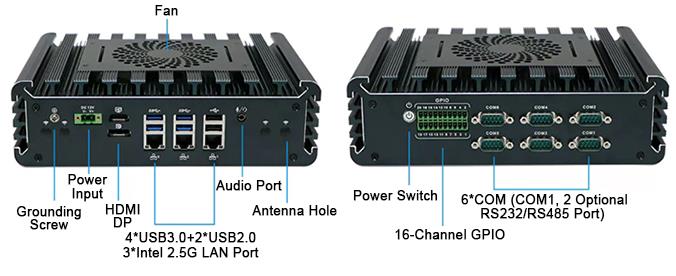
| Front I/O | 1*Power button, 1*16 pins GPIO Phoenix terminal, 6*COM (COM1,2 RS232/RS485) |
| Rear I/O | 1*2Pin Phoenix terminal, 1*HDMI, 1*DP, 4*USB3.0, 2*USB2.0 |
| 3*Intel i226-V 2.5G LAN, 1*audio&Mic | |
| Expansion Slot | 1*M.2 M-Key 2280 slot (support NVME) |
| 1*MINI PCIE slot (support WiFi/Bluetooth) | |
| 1*M.2 B-key slot 3042/3052 (support 4G), with SIM card slot | |
| Can be expand (The standard is without it): 2*USB2.0 | |
| Network | 3*Intel i226-V 2.5G LAN |
| Storage | 1*M.2 slot(support NVME), 1*2.5 inch HDD/SSD |
| Input Voltage | DC 12V |
| Other Function | Auto power on,Timing boot, Wake on LAN/ PXE/ Watchdog(level 0-255), TPM2.0 security encryption |
| Work Temp | 0℃~+50℃(business HDD), -20℃~+60℃(industrial SSD), Air flow surface |
| Work Humidity | 5%~95% Non-condensing state |
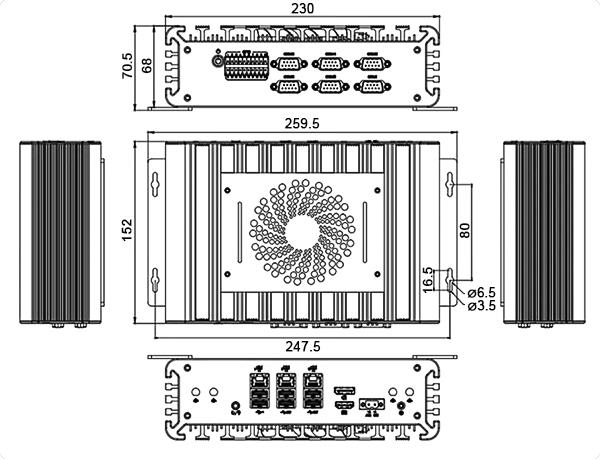
| Dimension | 230*152*68 mm |
| Weight | 2.4kg (No include wall mount) |
Feature
- Intel Core i5 Processor: Embedded industrial edge computer is powered by Intel Core i5-1135G7 with 4 cores and 8 threads for reliable industrial performance.
- Fanless Aluminum Design: All-aluminum fanless enclosure for silent operation and efficient heat dissipation.
- Triple 2.5G LAN: Industrial PC with 3× Intel i226-V 2.5G Ethernet ports for high-speed and reliable network communication.
- Rich Industrial I/O: 6 COM ports, 16-channel GPIO, USB, HDMI, and DP interfaces for versatile integration.
- Flexible Expansion: Industrial computer supports NVMe SSD, WiFi/Bluetooth, and optional 4G communication modules.
Detail
Size (unit: mm)
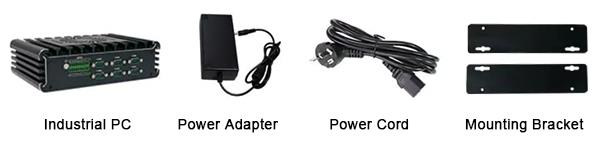
Package Includes
Tips: How to install fanless industrial PC quickly?
- Prepare the fanless industrial PC case first, and then install the fanless industrial PC power supply. Pay attention to the installation position when installing the industrial PC power supply, and the fan should face the motherboard.
- Install the motherboard. Fix the motherboard to fanless industrial PC case according to the small holes on motherboard.
- Install the CPU. Remove the CPU pressure bar, place the CPU on the clamping seat, and then fix the pressure bar.
- Install the fan on motherboard. Fix the fan with screws. Because the fan disperses the heat to motherboard, the fanless industrial PC will vibrate when it is working. If the installation is not reliable, it is easy to fail. When finished, connect the fan to power port on the motherboard.
- Install the memory stick. Open the buckle where the memory stick is installed and put the memory stick in.
- Install the hard disk. Connect the hard disk required by fanless industrial PC to the SATA interface.
Product reviews
Nice Industrial PC
Alex

6/20/2024 3:22 AM
Was this review helpful? (0/0)
Very reliable
Arron
3/1/2026 5:58 PM
We picked the i5 version for our line's HMI. It runs our SCADA software and multiple monitoring processes without a hitch. With six COM ports, we connected the PLC, barcode scanners, and a printer simultaneously, no extra hub needed.
Was this review helpful? (0/0)
Only registered users can write reviews
Related products

Embedded Industrial PC, Celeron 3965U, Linux/Windows 7/8/10
ATO-IPC-3965LW
$905.23
Embedded industrial PC with an optional Celeron 3965U or Core I5 processor, delivering reliable performance for industrial automation and control. Featuring a fanless aluminum alloy design, 9~36V wide-voltage input, and dual Gigabit LAN ports, it is ideal for system integration, machine vision, and edge computing. A smart choice for scalable and cost-effective industrial computing.

Embedded Fanless Industrial PC, Core i5 i7, Celeron 3865U
ATO-IPC-i35C3865
$1,232.46
Buy fanless industrial PC at affordable price. Optional CPU i5 3695U/i5 7360U, Celeron 3865U, dual core dual/quad threads, usable system Linux/Windows 7/Windows 10, RAM DDR4 1866/2133 SODIMM slot, max 16GB, I/O interface 2 Intel 1000M LAN, 4 COM, power supply DC 9~36V. Industrial computer supports embedded mounting, all-aluminum structure.

Rugged Fanless Industrial PC, Core i5 i7, Linux/Windows 10/11
ATO-IPC-Ci5i7LW
$819.23
This rugged fanless industrial PC features Intel Core i5/i7 processors with up to 4.7 GHz turbo frequency. Compatible with Linux, Windows 10/ 11. The aluminum design ensures quiet, stable operation in demanding environments, making it ideal for industrial automation, robotics, and edge computing. Industrial computer uses fanless design, factory price.

Mini Fanless Industrial PC, Celeron J1900, Linux/Win 7
ATO-IPC-J1900LW
$505.54
Fanless industrial PC with ideal price. CPU onboard Intel Celeron J1900 quad core, 1.99GHz,TDP: 10W, system Linux/Windows 7/Windows 10, supports DDR3L 1333/1600MHz SODIMM RAM slot, max turbo 8GB, I/O interface 6*COM, 2*1000M LAN, input voltage DC 12V. Industrial computer has mini size, embedded mounting.