
Features
- Super strong penetrability and diffraction ability, suitable for complex physical environment with small amount of data and many obstacles.
- Powerful software function, all specifications can be set by programming, such as power, frequency, air speed, address IP, etc.
- Large single package, single package supports up to 186 bytes, and is compatible with Modbus.
- All aluminum alloy shell, compact structure, easy installation, good heat dissipation, good electromagnetic compatibility, strong anti-interference ability.
- Built-in watchdog. Once an exception occurs, module will automatically restart and continue to work according to the original specification settings.
- Power supply reverse protection, over-current protection, antenna surge protection, high reliability, strong anti-interference ability.
Note: Before purchasing, please confirm that the frequency band used by the device complies with local laws and regulations.
Specification
| Model | ATO-E90-DTU (230SL22) | ATO-E90-DTU (230SL30) | ATO-E90-DTU (230SL37) |
| Transmit Power | 0.16W | 1W | 5W |
| Transmit Distance | 5km | 10km | 20km |
| Default Frequency | 230MHz | 230MHz | 230MHz |
| Frequency Range | 225~237.6MHz | 225~237.6MHz | 225~237.6MHz |
| Channel Spacing | 200kHz | 200kHz | 200kHz |
| Channels | 64, half duplex | 64, half duplex | 64, half duplex |
| Specification Feature | LoRa spread spectrum anti-interference | ||
| Operation Temperature | -40℃~+85℃ | ||
| Antenna Impedance | 50Ω | ||
| Supply Voltage | 10~28VDC | ||
| Transmit Current | 163mA | 806mA | 1037mA |
| Communication Interface | RS323/RS485 | ||
| Band Rate | Default 9600 | ||
| Adress | Default 0 | ||
| Air Data Rate | 1.2~70kbps | ||
| Size (H*W*D) | 82mm*62mm*25mm | 124mm*105mm*25mm | |
| Certification | CE, CCC | ||
| Buffer | 512bytes | ||
| Sub-package | Automatic subcontracting of 186 bytes to send | ||
Dimension Drawing (Unit: mm)
| ATO-E90-DTU (230SL22) | ATO-E90-DTU (230SL30) |
| |
| ATO-E90-DTU (230SL37) | |
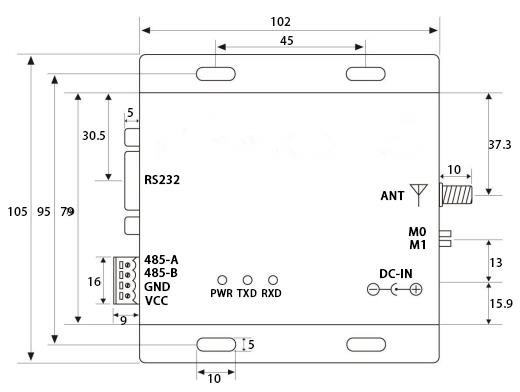 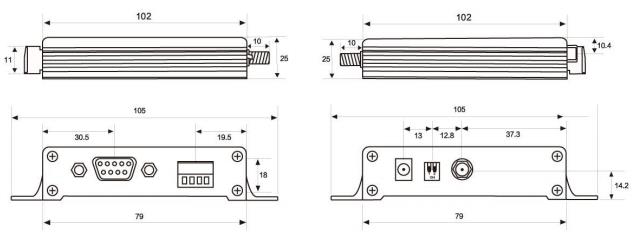 | |
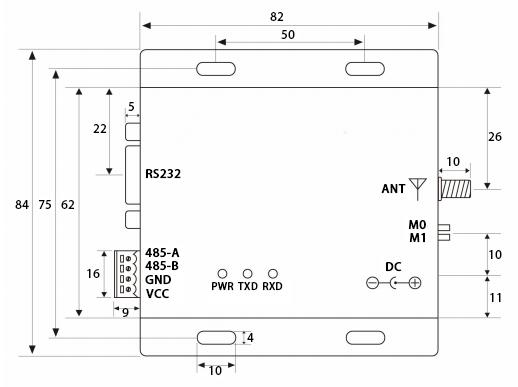
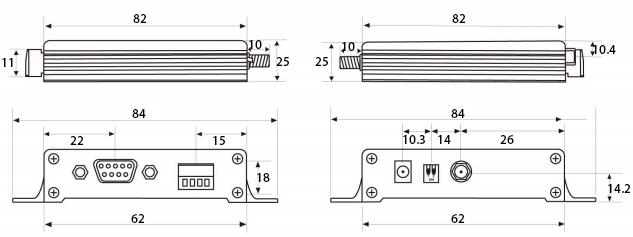
Tips: Preparations for using data transfer unit.
- Install antenna for data transfer unit, and then install power supply, and make sure that the DIP switch status is correct. Users select wire pressure method or power adapter to supply power according to needs, and either one can be selected.
- Use USB to RS232, USB to RS485 or other methods to connect computer to data transfer unit.
- Start two serial port debugging assistants. Select serial port baud rate of 9600bps and verification method of 8N can achieve serial port transparent transmission.
- If users need to modify specifications, please adjust data transfer unit to configuration mode and connect it to computer. Open configuration software to modify specifications. After completing configuration, be sure to restore DIP switch status, then communication can start.
Product reviews
Easy to install and set up, runs fast
nancy

9/19/2023 7:52 PM
I was pleasantly surprised by the strong diffraction capabilities of this data transmission unit. I have had problems with signal loss and interference in previous transmission units I have used, but this product completely solved those problems. It was very easy to install and set up, and it took me almost no extra time to get it up and running. In addition, it is stable and reliable and I have been using it for several months now without experiencing any problems or performance degradation.
Was this review helpful? (0/0)
Data transfer unit information
Tarns
4/29/2025 8:52 PM
I would like to know more about this data transfer unit. Can it connect to my WiFi network? Can data be sent to a web server? I need a cheaper way to send data to a web server.
Was this review helpful? (0/0)
Only registered users can write reviews
Related products

DTU Data Transfer Unit, LoRa, Strong Diffraction
ATO-DTFU-E9L
$114.95
Data transfer unit uses military-grade LoRa modulation technology, spread spectrum, and strong diffraction. Transmission distance can be up to 20km, transmission power can select 1W or 5W. The digital transceiver provides transparent RS232/RS485 interface, working frequency band is 433MHz. It can be connected with PLC, RTU, level gauge and other data terminals.

DTU Data Transfer Unit, Modbus RS485
ATO-DTFU-E8
$199.89
Data transfer unit (DTU) is a remote data control product. Wireless acquisition function supports Modbus RTU protocol, communication interface is RS-485, transmission distance is 8km. DTU has switch value follow and control acquisition functions. It supports 2-channel isolation switch inputs and 2-channel relay outputs.

DTU Data Transmission Unit, Modbus RS485/RS232
ATO-DTFU-E9C
$113.85
Data transmission unit adopts ultra-narrowband modulation technology. Built-in power amplifier (PA) and low-noise amplifier (LNA), make the maximum transmit power reach 5W. Transmission distance can be up to 10km, communication interface is RS232/RS485, be adapted to Modbus protocol. Support high-speed continuous uninterrupted data transmission.