
The tactical night vision binoculars goggles is a cutting-edge tool engineered for superior performance in low-light and night-time environments. Designed for versatility and reliability, it integrates advanced infrared imaging with a multifunctional tactical lighting system. Whether you're conducting outdoor exploration, professional surveillance, or navigating emergency situations, night time vision binoculars delivers clarity, durability, and tactical readiness in one compact device. Below, you’ll find its key features, specifications, application, and details.
Specification
| Model | ATO-DZ060 |
| Product name | 2060 Night Vision |
| Display screen | 3-inch screen |
| Lens | 42mm, f/1.4 Large aperture |
| IR | 3 levels of infrared setting |
| Functions | Recording, Photo Capture, Album Playback, Flashlight |
| Flashlight function | Constant Light at Maximum Power of 1W, Strobe at Maximum Power of 0.5W |
| Display Brightness | 8 adjustable levels |
| Digital Zoom | 8x digital zoom |
| Language | 12 countries optional |
| Connection Interface | High-Speed Micro USB 2.0 |
| Maximum Output | DC-5V/2A |
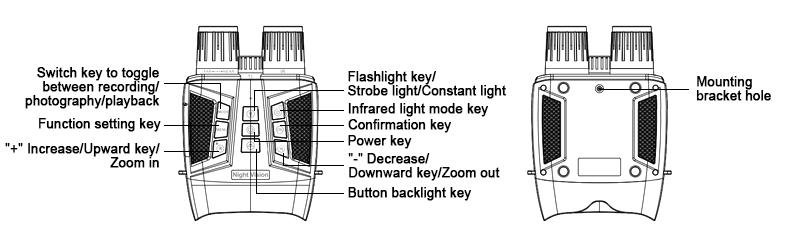
| Operating Buttons | 9 function buttons |
| Storage Capacity | Max 128GB (TF card file system FAT32) |
| Charging interface | Type-C |
| Power supply | 5000mAh lithium battery |
| Operating Temperature | -10°C - 55°C |
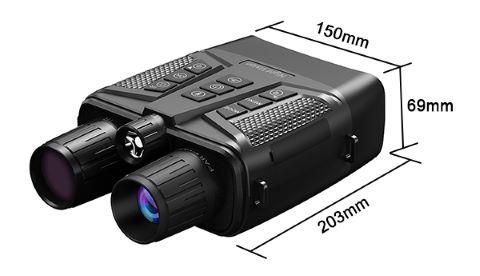
| Dimensions | 150mm × 203mm × 69mm |
| Bare Machine Weight | 852g |
Features
- Built-in Multifunctional Tactical Light: The binocular night vision device is equipped with a built-in tactical light that supports both steady and strobe modes. It not only provides illumination for nighttime operations but also functions as an emergency distress signal, enhancing user safety during outdoor activities and urgent situations.
- Integrated and Portable Design: Featuring a seamless integrated design, the tactical light is built directly into the night vision scope binoculars without the need for additional accessories. This simplifies operation and significantly improves portability and ease of use.
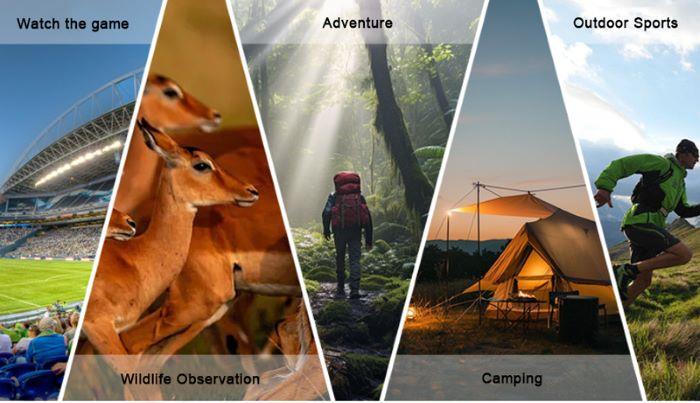
- Versatile Application Scenarios: The tactical night vision binoculars is suitable for a wide range of scenarios, including outdoor exploration, night navigation, and various emergency situations. This goggles offers reliable lighting support and can serve as both a distress signal and an emergency light in case of accidents such as getting lost or injured.
- High-Brightness LED Light Source: The tactical light in the night vision goggles uses a high-brightness LED light source, delivering stable and uniform illumination to ensure clear visibility in dark environments and improving nighttime observation and mobility.
- Dual Safety and Emergency Functions: Beyond basic lighting, the tactical night vision binoculars’s strobe mode can be used as a highly visible distress signal, helping users attract attention and receive timely assistance during emergencies.
Dimension (Unit: mm)
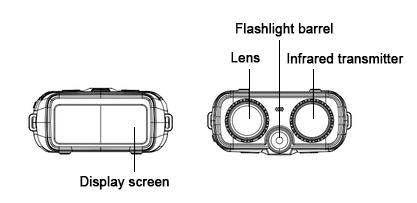
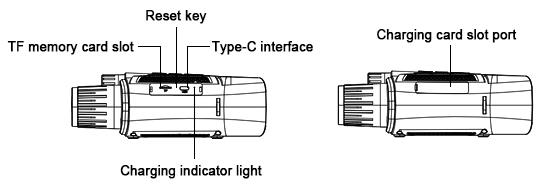
Details
Appliation
Tips: How to Connect the Tactical Night Vision Binoculars to a Computer?
Card reader
Remove the TF card from the device, then insert it into the card reader. Connect the card reader to the computer via USB.
USB-C wire
- Reading the memory card: Power off the machine, insert the TF card into the machine, connect the machine to the computer via a USB-C cable, and it will automatically connect when it is powered on again.
- Open "My Computer" or Windows Explorer, and open the removable disk of the TF card.
- Open the disk, copy the files from the memory card to the computer, the desktop or other disks before you can view them.
- Enter the camera mode: Power off the machine, pull out the TF card from the machine, connect the machine to the computer via a USB-C cable, and night vision goggles will automatically connect and enter the camera mode when it is powered on again. To disconnect, just unplug the data cable.

Related products

Day Night Vision Binoculars Goggles, 600m
ATO-NVG-Z9158
$241.70
High-quality day night vision binoculars goggles support night observation up to 600 meters, are equipped with 8x digital zoom and 3500mAh battery. It comes with a simple headband and also support mounting on a helmet for easy use. Night vision binoculars also feature 8-level brightness adjustment and backlit buttons, making it suitable for multiple scenarios.

Digital Night Vision Monocular Goggles for Helmet
ATO-NVG-9001
$105.15
Discover the ultimate night vision experience with our digital night vision monocular goggles for Helmet. Featuring a sharp 1.54-inch AMOLED display and powerful infrared illumination for clear vision up to 600 meters, this night vision goggles is built for performance. With 8x digital zoom, 58MP photo capture, it’s perfect for outdoor exploration, wildlife observation, and emergency use. The lightweight, helmet-compatible design and long-lasting 2600mAh battery make it your reliable companion in the dark.

Full-color 4K Night Vision Binoculars Goggles, 1000m
ATO-NVG-DS371
$258.54
Factory price 4K night vision binoculars goggles are equipped with 3-inch full-color screen and have night vision distance of 1000m. It also features WiFi connectivity and picture-in-picture function, making monitoring more convenient. 5100mAh battery of this outdoor night vision goggles supports 18 hours of long battery life, and it is suitable for various scenarios such as wildlife observation, camping, and outdoor exploration.

Infrared Night Vision Monocular Goggles, 8x Digital Zoom
ATO-NVG-9005
$202.63
See clearly in total darkness with the infrared night vision monocular goggles featuring 8x digital zoom. Equipped with a powerful infrared illuminator and a sensitive starlight-grade CMOS sensor, this device captures sharp 40MP images and records 4K videos day or night. Powered by a 2000mAh battery, this compact and versatile monocular is your reliable companion for night exploration, surveillance, and outdoor adventures.

Night Vision Binoculars Goggles with Camera, 5000mAh
ATO-NVG-CZ080
$171.54
Night vision binoculars goggles with camera is for sale at low price. It is equipped with a 5000mAh battery (16h runtime), an 8x digital zoom lens and a 600m max viewing distance. Infrared night vision binoculars also has a tactical flashlight and infrared light, meet diverse scenario needs.