Handheld Barcode/QR Code Inkjet Printer

$384.62
Low price handheld inkjet printer can 360-degree print high definition bar codes, QR codes, trademarks and graphics, date, etc. Keyboard control panel, 300DPI-600DPI printing accuracy, 1-4 printing lines, 3-12.5mm printing height, 2-5mm printing distance. Fast printing and long use time, suitable for printing on different materials like wood, plastics, metal and so on.
SKU: ATO-PRINT-01
*
Free Shipping
Delivery date: 6-12 days

Handheld inkjet printer coding machine with keyboard control is light and portable, is suitable for printing a variety of content including Barcode, QR code, time, date, number, symbol, trademarks, graphics and so on, and supports printing on various materials like wood, box, stone, plastic, tube, metal, cloth, glass, etc. Moreover, you can control this printer by your mobile phone after Bluetooth wireless connection.

Specification

ModelATO-CP2000SE
Printing Accuracy4 grayscales between 300DPI and 600DPI
Printing Lines1 to 4 lines, can be adjusted
Printing Height3-12.5mm
Printing Distance2-5mm (the distance between the print nozzle and the object that needs printing)
Pinting Direction360 degree
Printing SpeedThe highest speed can be 50m/min (continuous printing)
Printing GraphicsThe device can print almost all kinds of trademarks and graphics
Printing CodeBar code and QR code
Support MaterialsWood, carton, stone, firber board, steel, tube, pipe, metal, plastic, aluminum foil, cables, etc.
Ink Capacity25mL
Ink Type *Water-based ink: black
Solvent ink: black
Battery1500mAh Lithium battery
Continuous Printing TimeMore than 7 hours
System Power Consumption≤1W
Control PanelKeyboard
Information Storage50
External InterfaceUSB port (Type-C)
Working EnvironmentTemperature: 0℃ ~ 40℃
Humidity: 10% ~ 80%RH
Size209mm*113.5mm*75mm (L*W*H)
Weight440g
Packing ListHandheld printer×1, Ink Cartridge×1, Charger×1, User Manual×1

Note:
* Solvent ink is used for printing on plastics, glass, metal, pipes, stone products, wood, fiber board, aluminum foil, cables and films, etc.
Water-based ink is suitable for printing on the hygroscopic materials such as paper and carton.

Printing Materials & Content
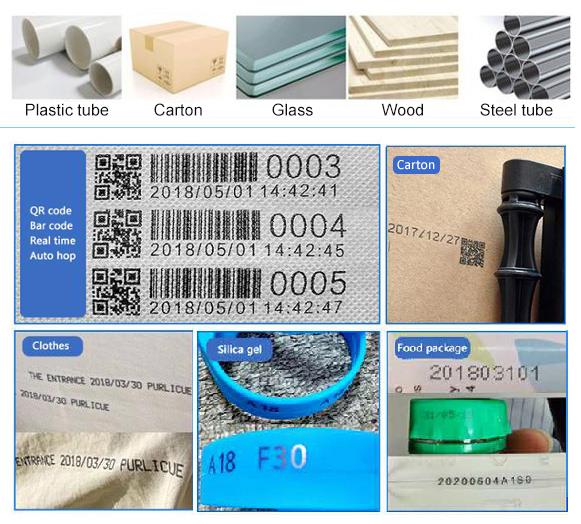
Handheld Inkjet Printer Printing Materials and Content

Tips for Using Handheld Inkjet Printer

1. Please shake the ink cartridge before use.
2. When the ink cartridge is placed separately, please cover the head of ink cartridge. Otherwise, the ink cartridge couldn’t use because of the nozzle clogging.
3. While editing the information, setting the machine or not using the printer, please cover the head of nozzle. Otherwise, the ink cartridge couldn’t use because of the nozzle clogging.
4. When you load or unload the cartridge, please make sure the inkjet printer is turned off.
5. The ink cartridge is consumable. Its expired time is 6 months. The ink cartridge is not covered under warranty.
6. The DRV mode must be Synchronizer. Settings section has been set up in advance. Please don’t change the system setting.

Product reviews
Very suitable for printing beginners
5
Mamac
Avatar
9/28/2021 11:57 PM
This is my first handheld barcode/QR code inkjet printer, and it is fully capable of printing. I have been using it for more than a week and it is very suitable for my label printing needs. So far, I have printed more than 50 labels without any problems.
Was this review helpful? Yes No (0/0)
Portable, easy to use
5
Wieland
Avatar
5/26/2022 3:33 AM
The handheld inkjet printer works very well. Keep in mind that the pressure must be moderate to avoid impairing the design to be printed. Drying is fast but not immediate. The performance is very good, the print quality too.
Was this review helpful? Yes No (0/0)
Portable, easy to use inkjet printer
5
Sapello
Avatar
5/30/2022 2:53 AM
My experience with the handheld printer, at first I did not understand it well, I wrote to ATO customer service and they always responded very attentively, with examples and videos. I was able to get my work done better than I expected,Great product
Was this review helpful? Yes No (0/0)
Printing Content
4
Wolinas
Avatar
10/21/2026 3:14 AM
Can the ATO-PRINT-01 printer print barcodes and dates simultaneously? Also, is this printer the best choice for printing on plastic packaging (such as the bottom of coffee bags)? Thank you.
Was this review helpful? Yes No (0/0)
ATO Responded
This printer can print on plastic packaging, but it does not support printing barcodes and dates together.
Write your review
  • Only registered users can write reviews
*
*
  • Bad
  • Excellent
*
*
*
*

Handheld inkjet printer coding machine with keyboard control is light and portable, is suitable for printing a variety of content including Barcode, QR code, time, date, number, symbol, trademarks, graphics and so on, and supports printing on various materials like wood, box, stone, plastic, tube, metal, cloth, glass, etc. Moreover, you can control this printer by your mobile phone after Bluetooth wireless connection.

Specification

ModelATO-CP2000SE
Printing Accuracy4 grayscales between 300DPI and 600DPI
Printing Lines1 to 4 lines, can be adjusted
Printing Height3-12.5mm
Printing Distance2-5mm (the distance between the print nozzle and the object that needs printing)
Pinting Direction360 degree
Printing SpeedThe highest speed can be 50m/min (continuous printing)
Printing GraphicsThe device can print almost all kinds of trademarks and graphics
Printing CodeBar code and QR code
Support MaterialsWood, carton, stone, firber board, steel, tube, pipe, metal, plastic, aluminum foil, cables, etc.
Ink Capacity25mL
Ink Type *Water-based ink: black
Solvent ink: black
Battery1500mAh Lithium battery
Continuous Printing TimeMore than 7 hours
System Power Consumption≤1W
Control PanelKeyboard
Information Storage50
External InterfaceUSB port (Type-C)
Working EnvironmentTemperature: 0℃ ~ 40℃
Humidity: 10% ~ 80%RH
Size209mm*113.5mm*75mm (L*W*H)
Weight440g
Packing ListHandheld printer×1, Ink Cartridge×1, Charger×1, User Manual×1

Note:
* Solvent ink is used for printing on plastics, glass, metal, pipes, stone products, wood, fiber board, aluminum foil, cables and films, etc.
Water-based ink is suitable for printing on the hygroscopic materials such as paper and carton.

Printing Materials & Content

Handheld Inkjet Printer Printing Materials and Content

Tips for Using Handheld Inkjet Printer

1. Please shake the ink cartridge before use.
2. When the ink cartridge is placed separately, please cover the head of ink cartridge. Otherwise, the ink cartridge couldn’t use because of the nozzle clogging.
3. While editing the information, setting the machine or not using the printer, please cover the head of nozzle. Otherwise, the ink cartridge couldn’t use because of the nozzle clogging.
4. When you load or unload the cartridge, please make sure the inkjet printer is turned off.
5. The ink cartridge is consumable. Its expired time is 6 months. The ink cartridge is not covered under warranty.
6. The DRV mode must be Synchronizer. Settings section has been set up in advance. Please don’t change the system setting.

Product reviews
Very suitable for printing beginners
5
Mamac
Avatar
9/28/2021 11:57 PM
This is my first handheld barcode/QR code inkjet printer, and it is fully capable of printing. I have been using it for more than a week and it is very suitable for my label printing needs. So far, I have printed more than 50 labels without any problems.
Was this review helpful? Yes No (0/0)
Portable, easy to use
5
Wieland
Avatar
5/26/2022 3:33 AM
The handheld inkjet printer works very well. Keep in mind that the pressure must be moderate to avoid impairing the design to be printed. Drying is fast but not immediate. The performance is very good, the print quality too.
Was this review helpful? Yes No (0/0)
Portable, easy to use inkjet printer
5
Sapello
Avatar
5/30/2022 2:53 AM
My experience with the handheld printer, at first I did not understand it well, I wrote to ATO customer service and they always responded very attentively, with examples and videos. I was able to get my work done better than I expected,Great product
Was this review helpful? Yes No (0/0)
Printing Content
4
Wolinas
Avatar
10/21/2026 3:14 AM
Can the ATO-PRINT-01 printer print barcodes and dates simultaneously? Also, is this printer the best choice for printing on plastic packaging (such as the bottom of coffee bags)? Thank you.
Was this review helpful? Yes No (0/0)
ATO Responded
This printer can print on plastic packaging, but it does not support printing barcodes and dates together.
Only registered users can write reviews