
Electronic weighing scale indicator offers multiple backlight options, a 6V/4.0AH maintenance-free battery, and a bright red LED display for clear reading. Designed for truck scales and weighbridges with strong vibration resistance and low-voltage protection.
Specification
| Model | ATO-XK3190-A12E |
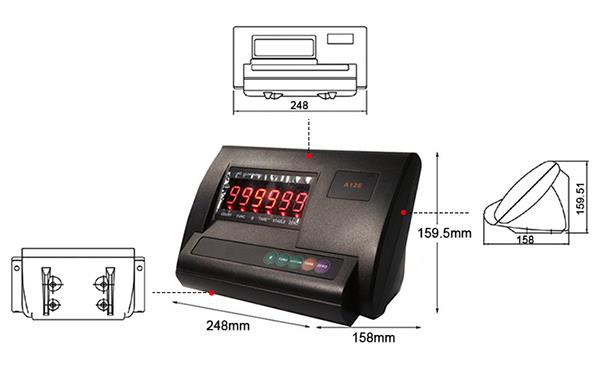
| Dimensions | 248 × 158 × 159.5 mm |
| Readability | 1/30000 |
| Power Supply | Built-in 6V/4AH rechargeable battery |
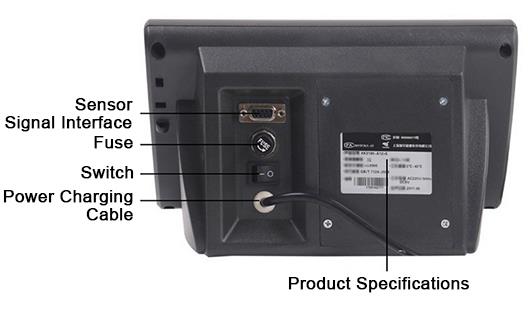
| Communication Interface | 5-pin |
| Accuracy | A/D conversion |
| Display | LED red digital display |
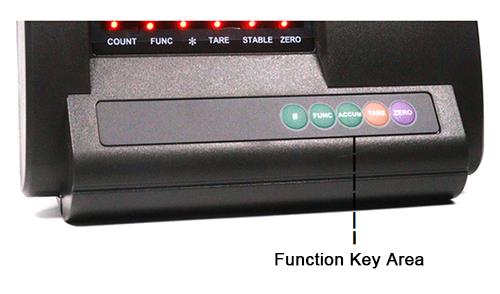
| Functions | Weighing, tare, zero setting, etc. |
| Applications | Mainly used for electronic truck scales, platform scales, and weighbridges. |
Feature
- Internal code display enables convenient observation and tolerance analysis, eliminating the need for calibration weights.
- Advanced software technology enhances vibration resistance and electronic weighing scale indicator stability.
- Zero tracking range and zero-setting range (power-on/manual) can be set independently.
- Adjustable digital filtering speed, amplitude, and stabilization time for improved accuracy.
- Built-in rechargeable design supports convenient charging at any time.
- Equipped with undervoltage indication and protection for safe operation.
- The weighing indicator includes a 6V/4AH maintenance-free rechargeable battery.
- Optional 5-pin communication interface for flexible connectivity.
Detail
Front View
Rear View
Size (unit: mm)
Application

Tips: How to calibrate electronic weighing scale indicator?
1.Enter Calibration Mode
- Hold down the designated key combination while switching on the power.
- Access the calibration or setup menu.
- Refer to electronic weighing scale indicator manual for the specific key sequence.
2.Zero Calibration (No Load)
- Ensure the weighing indicator platform is completely empty.
- Wait for a stable display.
- Press ZERO to store the no-load signal as the reference zero point.
3.Span Calibration (Load Calibration)
- Place a known standard weight on the weighing scale indicator platform (e.g., 50 kg or 100 kg, depending on scale capacity).
- Once the reading stabilizes, press ENTER.
- Input the exact test weight value.
- The system calculates the scale factor to ensure accurate readings.
4.Verification
- Remove the weight – the display should return to zero.
- Reapply the same weight – the displayed value should match the reference weight.
- Repeat using different weights to confirm linearity and accuracy.
5.Save and Exit
- Press FUNC to save calibration data.
- Exit calibration mode.
- The weighing indicator will restart and operate in normal weighing mode.
Product reviews
Smooth and accurate
Caleb

11/18/2025 5:54 PM
I’ve been using this electronic weighing scale indicator on our truck weighbridge, and it has worked very reliably. The ultra-bright red LED display is easy to read in both sunlight and low-light conditions, and the selectable backlight modes make it convenient for day-to-night use. The built-in 6V/4.0AH battery lasts surprisingly long, and the low-voltage protection is reassuring during heavy daily operation. It also handles vibration very well—important when trucks are constantly moving on and off the platform.
Was this review helpful? (0/0)
Only registered users can write reviews
Related products

Digital Weighing Indicator, Print/ RS485/ 4-20mA/ WiFi
ATO-WI-GSI404
$133.38
Digital weighing indicator for sale, featuring 40 times/sec A/D conversion, multi-load cell support, and selectable filtering time parameters, providing print, RS485, 4-20mA and WiFi for flexible data connectivity. The weighing indicator is designed for stable and precise operation under –25°C to +55°C environments, ideal for industrial and commercial weighing systems.

Industrial Weighing Indicator for Platform Scale
ATO-WI-E218W
$118.82
The industrial weighing indicator is designed for platform scales and features a clear 6-digit LED display, a high accuracy class, and up to 3000 calibration divisions for reliable and precise measurements. With robust connectivity via sensor signal ports and a wide operating temperature range, it is an ideal display unit for various industrial weighing applications.

Electronic Weighing Indicator with Printer
ATO-WI-XK3109
$333.68
Electronic weighing indicator with printer for sale, designed for accurate and stable weighing performance. Equipped with high-precision A/D conversion, a clear LED display, and AC/DC dual power supply for versatile use. Supports data storage, RS232 communication, and direct printing of reports—ideal for truck scales, platform scales, and industrial weighing applications.

Wireless Digital Weighing Indicator for Industrial Scale/ Load Cell
ATO-WI-280P
$289.26
The wireless digital weighing indicator features a LCD screen for clear visibility and supports kg, t, lb units. With accurate clock, auto power-off, and RS232 communication interface, ideal for industrial scale and load cell weighing applications.