
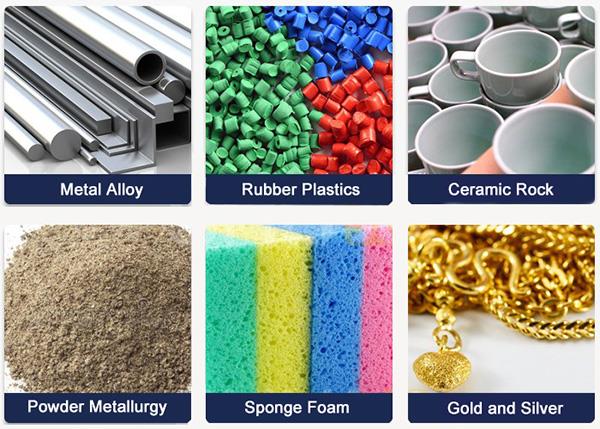
The benchtop solid density meter uses a large LCD screen display, which is intuitive and convenient to operate. It is widely used in rubber and plastics, wires and cables, composite materials, cosmetics, glass, hardware and other industries
Features
- Benchtop solid density meter has a wide range of applications and can measure irregular solid materials such as blocks, particles, films and floating objects.
- The solid density meter has a precise compensation function and provides four compensation settings-water temperature adjustment, measurement medium density, waterproof medium treatment, and density upper and lower limit settings.
- It supports a wide range of density and can test solid density >1 or <1 to meet the testing needs of different materials.
- The solid density meter provides flexible parameter settings and supports two parameter settings: solid density and density upper and lower limits, which is convenient for testing.
- The digital solid density meter supports convenient data output and is equipped with an RS-232 interface, which can be connected to a printer or PC for convenient data management and recording.
- It adopts a clear display design and is equipped with a large LCD backlight display, making data reading clear and intuitive.
Specification
| Model | ATO-JHY-300 | ATO-JHY-300W | ATO-JHY-600W |
| Weighing Range | 0.01–300g | 0.005–300g | 0.005–600g |
| Specific Gravity Accuracy | 0.001 g/cm³ | ||
| Tank Dimensions | 150 × 100 × 85 mm | ||
| Measurement Time | Approx. 6 seconds | ||
| Output Port | RS-232 interface | ||
| Measurement Types | Solids, granules, lumps, emulsions, foams | ||
| Specific Gravity Range | Can test both >1 and <1 | ||
| Setting Functions | Temperature compensation setting, solution compensation setting | ||
| Measurement Functions | Weight, density, volume | ||
| Weight | 7.5 kg | ||
Operating Steps
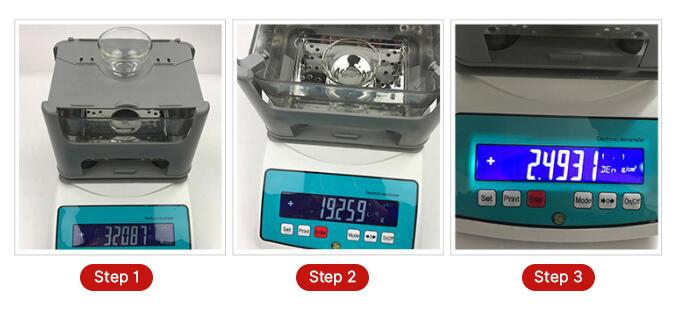
- Measure the product's weight in air.
- Measure the product's weight in water.
- The density value is displayed directly.
Accessories
Applications
Tips: Maintenance of solid density meter
- Wipe the housing and test platform of the density meter with a soft cloth regularly to prevent dust and debris from affecting the measurement accuracy.
- Avoid pressing or hitting the sensor hard to prevent damage or loss of accuracy.
- Check the test platform regularly for wear or looseness, and tighten or replace it if necessary.
- Calibrate the density meter regularly according to the instructions to ensure measurement accuracy. If there is a measurement deviation or error beyond the allowable range, recalibrate it in time.
- Check the connection port regularly to ensure a stable connection to avoid data transmission interruption.
- Confirm that the power supply voltage and the socket are in good contact to avoid equipment damage due to unstable voltage.
Only registered users can write reviews
Related products

Gold Density Meter for Gold Purity Test, 0.001g/cm³, 0.01-2000g
ATO-DENSITY-DX
$1,475.81
High-precision gold density tester for sale online, providing a variety of weighing ranges to choose from (0.005g~300g, 0.005g~600g, 0.01g~1200g, 0.01g~2000g, 0.001g~120g), can accurately detect the purity of precious materials such as gold, platinum, silver, jade, etc. The measurement accuracy is up to 0.001g/cm³.

Digital Wood Density Meter, 0.01g/cm³-1.2g/cm³
ATO-DENSITY-120DEN
$908.92
Digital wood density meter uses a digital display screen, with a wide measuring range of 0.01g/cm³~1.2g/cm³ and an accuracy of ≤±0.01g/cm³, which can accurately detect wood density. It is suitable for working environments of 0℃~50℃, can work under humidity conditions of <80%RH, is light in weight and easy to carry.

Portable Online Liquid Density Meter, 0-3.0g/cm³, 300mm-25m
ATO-DENSITY-QLZX
$2,698.31
Handheld online liquid density meter is suitable for a variety of liquid density detection, with a measurement range of 0-3.0 g/cm³, a liquid temperature adaptability range of -25℃ to 110℃, and a measurable depth of 300mm to 25m. Its lightweight design is easy to carry and can work in an environment of 0℃ to 85℃.

Electronic Liquid Density Meter for Oil/Water, 0.001g/cm³
ATO-DENSITY-SJY
$721.36
Factory price electronic liquid density meter for sale, using high-precision sensor, combined with Archimedes principle, can quickly and accurately measure liquid density, density accuracy up to 0.001g/cm³. It has two weighing ranges of 0.01-300g/0.01-600g to choose from, equipped with a large-screen blue backlit LCD display, the data is clear and easy to read.