
This provided servo motor drive has 2000W to 5.5kW output power, single-axis control, 50A/75A current rating, three-phase 220V AC voltage, 2500 lines incremental encoder or 17/23 bit absolute encoder for feedback, is commonly paired with a 2kW to 5.5kW ATO servo motor.
Servo Drive Specification
| Model | ATO-SG-AS755500 (Click it to see more specifications) |
| Manual | Servo Driver Product Manual Servo Driver User Manual |
| Output Power | 2000W-5.5kW |
| Voltage | Three-phase 220V AC |
| Input Signal Type* | Pulse + analog (±10V) signal or pulse signal (Optional) |
| Current | 50A/70A |
| Control Mode | Position control, Speed control, JOG operation |
| Encoder Feedback | 2500 lines incremental encoder |
| 17/23 bit absolute encoder | |
| Structure | Base-mounted type |
| Weight | 3.5 Kg |
| Application | For 200W-400W AC servo motor |
| Operate Temperature | 0℃~+50℃ |
| Humidity | <90% (no frost) |
Note: Our AC Servo Drive will come with an RS485 control software, so you can only monitor the motor parameters through RS-485 communication, but you cannot use it to control the motor.
Servo Drive Terminal Details
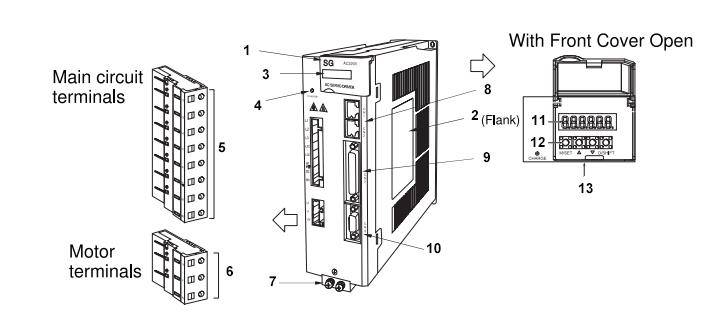
| NO. | Name | Description |
| 1 | Front Cover | -- |
| 2 | Nameplate | Indicates the SERVOPACK model and rating. |
| 3 | Input Voltage | -- |
| 4 | Charge | Lights up when the main circuit power is turned on. Note: Even if you turn OFF the main circuit power supply, this indicator will light as long as the internal capacitor remains charged. Do not touch the main circuit or motor terminals while this indicator is lit. Doing so may result in electric shocks. |
| 5 | Main Circuit Terminals | The terminals depend on the main circuit power supply input specifications of the SERVOPACK. |
| 6 | Servo Motor Terminals (U, V, W) | The connection terminals for the servo motor main circuit cable (power line). |
| 7 | Ground Terminal | The ground terminals to prevent electric shock. Always connect this terminal. |
| 8 | 485 Communication (CN1,CN2) | -- |
| 9 | I/O Signal Connector (CN3) | Connect to reference input signals and sequence I/O signals. |
| 10 | Encoder Connector (CN4) | Rotary servo motor: Connect to the encoder in the servo motor. Linear servo motor: Connect to a serial converter unit or linear encoder. |
| 11 | Panel Display | Used to display SERVOPACK status, alarm numbers, and parameters. |
| 12 | Panel Operation keys | Used to set parameters. |
| 13 | Panel Operator | -- |
Servo Drive Dimension
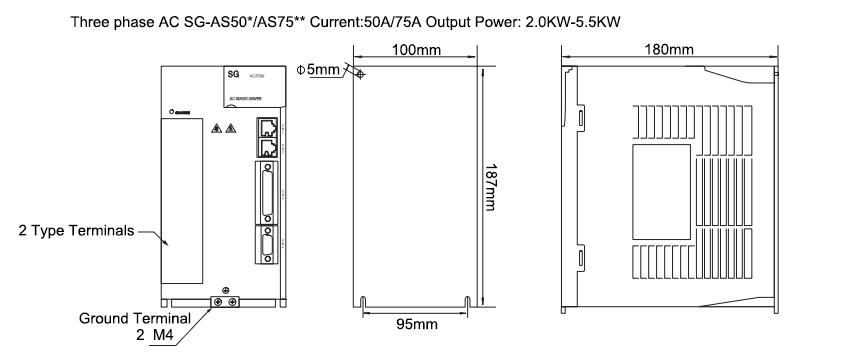
Tips: Servo Motor Operating Safety Precautions
- Before starting the servo motor, correctly set all drive parameters to match the motor and connected equipment. Incorrect settings may cause unstable operation, equipment malfunction, or loss of control.
- Do not touch the motor shaft or any rotating parts while the motor is running, as this may cause serious injury.
- For safety, test the servo motor under no-load conditions first. Connect the load only after confirming that the motor operates normally and responds correctly to control commands.
- Do not touch the motor housing, heat sink, or radiator during operation or immediately after shutdown. These surfaces may become hot and cause burns.
Product reviews
Good AC servo motor driver
Lyndsey

6/1/2021 8:57 PM
Can we use your sevo drive to run our servo motor which isnot your brand?
Was this review helpful? (0/0)
Very satisfied with this servo drive
Ford
6/21/2026 7:22 PM
Great upgrade replacement for our old servo control system. This 3-phase 220V servo drive covers 2kW to 5.5kW power range, adapting to multiple motor models on our production line. It supports position control, speed control and JOG operation, meeting all our daily debugging and production demands. The built-in RS485 monitoring software makes parameter checking super convenient.
Was this review helpful? (0/0)
Only registered users can write reviews
Related products

2.5 kW AC Servo Motor Kit, 10 Nm, 2500 rpm
ATO-SERVO-130S2500
$786.96
2.5 kW brushless AC servo motor kit for sale, featuring three-phase 220V rated voltage, 2500 rpm low-speed operation, 10 Nm rated torque, and a maximum output torque of 25 Nm. Designed with a 130 mm square flange size, this high-performance servo motor kit delivers stable operation, fast response, and precise motion control for industrial automation applications.