
Low-cost desoldering station features variable temperature control and automatic shutdown. 900W desoldering station features an ergonomic handle and lightweight construction to reduce fatigue during extended use.
Specification
| Model | ATO-DS-8248 |
| Dual Screen Digital display | Yes |
| Auto Shutoff | Yes |
| Power Consumption | 900W |
| Melting Time | 2s |
| Dimension | 170*130*100mm |
| Net Weight | 536g |
| Soldering Iron | |
| Power | 60W |
| Output Voltage | DC 24V |
| Control Method | Knob Adjustment |
| Display Form | Dual-screen digital display |
| Temperature Control Range | 100-400°C |
| Handle Cable Length | 1.3 Meters |
| Soldering Iron Length | 43mm |
| Soldering Gun | |
| Airflow Type | Gentle Brushless Blower |
| Power Consumption | 700W |
| Air Flow | ≤ 120L /min |
| Temperature Range | 100- 550°C |
| Wind Way | Whirlwind |
| Display Form | Digital Display |
| Noise | ≤45dB |
| Handle Cable Length | 1 Meter |
Features
- Precision and Control: 800W desoldering station offers precise and controlled solder removal.
- Temperature Control: Desoldering stations feature adjustable temperature controls, allowing users to set the optimal temperature for different soldering tasks.
- Vacuum Suction: A desoldering station is a built-in vacuum suction mechanism.
- Noise Reduction Design: The nozzle spiral guide air can reduce the noise, not direct blowing work, heating air more uniform and stable.
Details
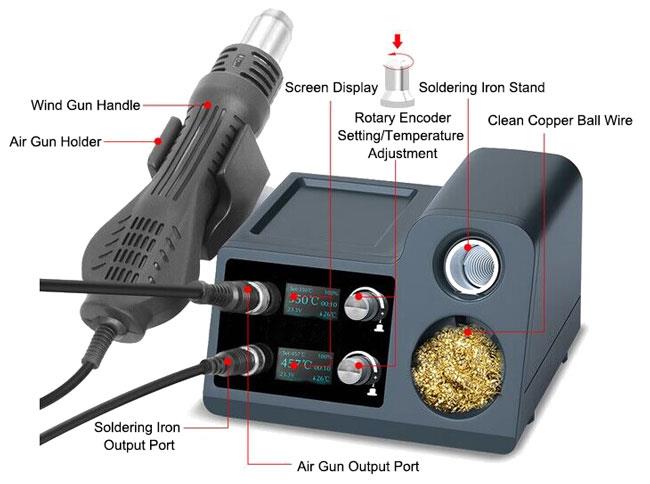
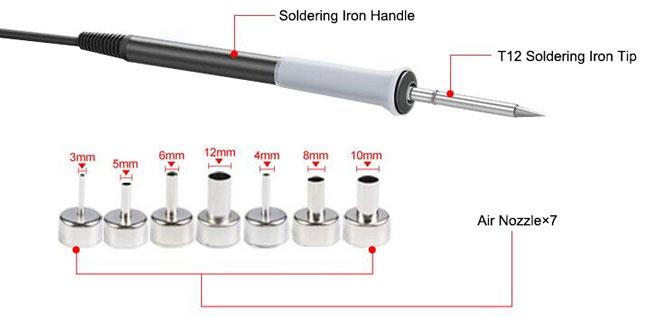
Applications
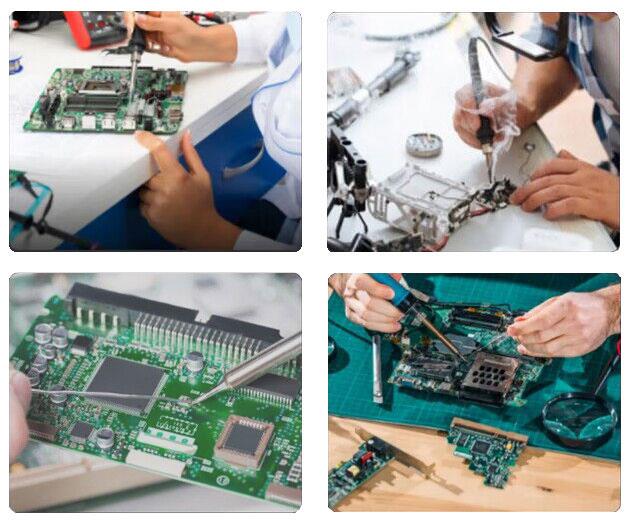
The application areas of a desoldering station include electronic repair and rework, circuit board maintenance, and soldering/desoldering components for various electronic devices.
Tips: How to clean a desoldering station?
- Power off and unplug the desoldering station: Before you begin cleaning, make sure the station is turned off and disconnected from the power source to avoid any accidents.
- Disassemble the components: Depending on the design of your desoldering station, you may need to disassemble it to access the parts that require cleaning. Refer to the manufacturer's instructions or user manual for guidance on how to disassemble your specific model.
- Clean the nozzle or tip: The desoldering nozzle or tip is the component that comes into direct contact with the solder. It can get clogged with residue over time. Remove the nozzle or tip from the desoldering tool and clean it using a brass wire brush or a specialized desoldering tip cleaner. Gently scrub away any solder residue until the tip is clean. Be careful not to damage the tip.
- Clean the filter: Many desoldering stations have a filter to trap solder and debris. Locate the filter and remove it from the station. Dispose of the collected debris properly. If the filter is washable, rinse it with warm water and mild soap to remove any remaining residue. Allow it to dry completely before reinserting it.
- Clean the vacuum chamber: The vacuum chamber is part of the desoldering station that collects the solder and debris. Use a small brush or a soft cloth to clean the inside of the vacuum chamber. Remove any loose debris or solder that may have accumulated.
- Reassemble the components: Once all the components are clean and dry, reassemble the desoldering station following the manufacturer's instructions. Make sure all the parts are securely in place.
- Perform a test run: After cleaning and reassembling the desoldering station, perform a test run to ensure it is functioning properly. Check that the suction is strong and the temperature control is working as expected.
Remember to always consult the user manual provided by the manufacturer for specific instructions and any precautions unique to your desoldering station model.
Product reviews
Powerful Performance
Isabeau

10/23/2023 3:26 AM
The 900W power capacity allows it to quickly and efficiently remove solder from electronic components.
Was this review helpful? (0/0)
Low noise variable temperature desoldering station
Louis
8/10/2026 7:09 PM
Really like this desoldering station. Operating noise stays under 45dB, much quieter than my older units. Lightweight ergonomic handles reduce hand fatigue during long repair sessions.
Was this review helpful? (0/0)
Only registered users can write reviews
Related products

2 in 1 800W Desoldering Station, Variable Temperature
ATO-DS-8115
$236.78
Buy a desoldering machine with variable temperature and automatic shut-off online. 800W 2-in-1 desoldering station is equipped with a variety of interchangeable air nozzles that allow users to quickly remove solder from boards and components.

750W Desoldering Station, Variable Temperature
ATO-DS-812
$168.76
750W desoldering station with an air gun and soldering iron. Variable temperature control allows the desoldering station to handle a wide range of electronic components and solder joints with precision and ease.

800W Desoldering Station, Variable Temperature
ATO-DS-8210
$239.76
Powerful desoldering station is equipped with a double LED digital display, variable temperature control, and a two-in-one heat core iron tip for fast heat-up. 800W desoldering station is equipped with 7 sets of interchangeable nozzles, allowing the user to adapt to different soldering tasks and component sizes.